Cassandra
Distributed Metada’s
What is Cassandra?
In the context of the Nutanix architecture, Cassandra is a crucial component that functions as the distributed metadata store for the cluster.
Detailed Role and Function:
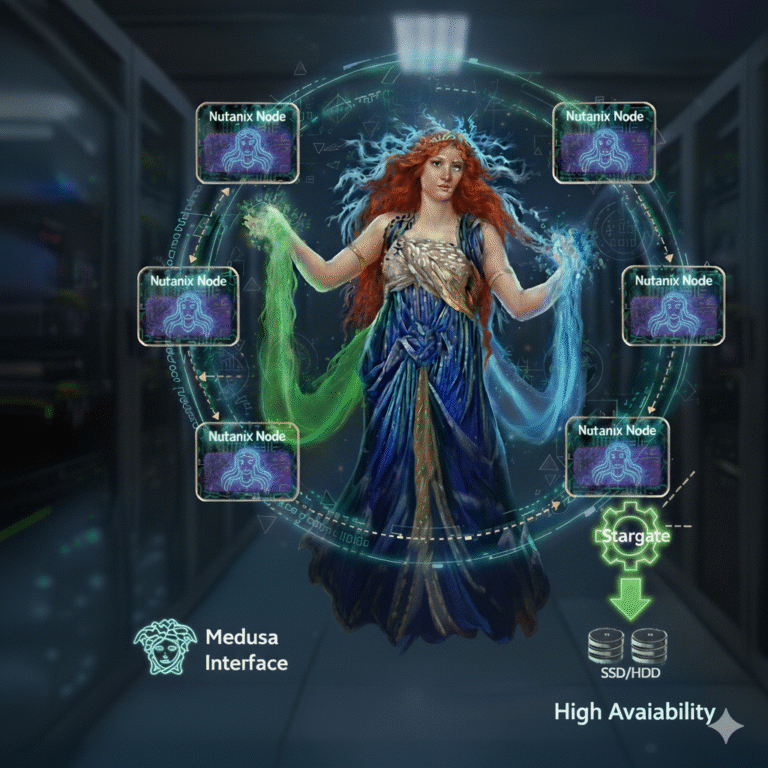
Cassandra’s primary responsibility is to store and manage all of the cluster’s metadata in a distributed, ring-like structure. This is based on a heavily modified version of Apache Cassandra, an open source NoSQL distributed database.
Instead of having a single, centralized location for metadata (which would create a single point of failure), this information is distributed across all nodes in the cluster. This architecture ensures high availability and resilience.
Key characteristics include:
- Strict Consistency: The platform uses the Paxos algorithm to enforce strict consistency for all metadata. This means a majority of nodes must agree on a change before it is committed, guaranteeing data integrity.
- High Availability: The Cassandra service runs on every node within the Nutanix cluster, eliminating single points of failure.
- Distributed Nature: Each Nutanix node is responsible for a subset of the platform’s overall metadata, which eliminates traditional bottlenecks by allowing metadata to be served and managed by all nodes concurrently.
Medusa Interface: The service is accessed internally through an interface called Medusa.
In essence, Cassandra acts as the authoritative, distributed, and resilient “address book” for all data within the Nutanix cluster, tracking where data blocks and their replicas are physically stored. This allows the system to quickly locate and retrieve data while ensuring its integrity and availability, even in the event of a node or disk failure.
Where are locate Cassandra's files?
For monitoring and troubleshooting the Cassandra metadata database on a Nutanix CVM, you can find relevant logs in the following locations:
Primary Log Directory: All operational logs for the Cassandra metadata database are stored in the
/home/nutanix/data/logs/cassandradirectory;Most Important Log Files: Within that primary directory, the
system.log*files contain the most detailed and useful information for analyzing Cassandra’s behavior. These logs include timestamped entries for all database operations and events;Cassandra Monitor Process: The logs for the
cassandra_monitorprocess, which handles starting the Cassandra service, are located in the parent directory at/home/nutanix/data/logs;
Let’s use a practical scenario to illustrate Cassandra’s crucial role in the day-to-day operations of a Nutanix cluster.
Imagine you have a Virtual Machine (VM) running a database;
Scenario: The VM needs to save a new record to the database;
This simple act of “saving a record” triggers a series of operations where Cassandra is the master of metadata;
Step 1: The VM’s Write Request
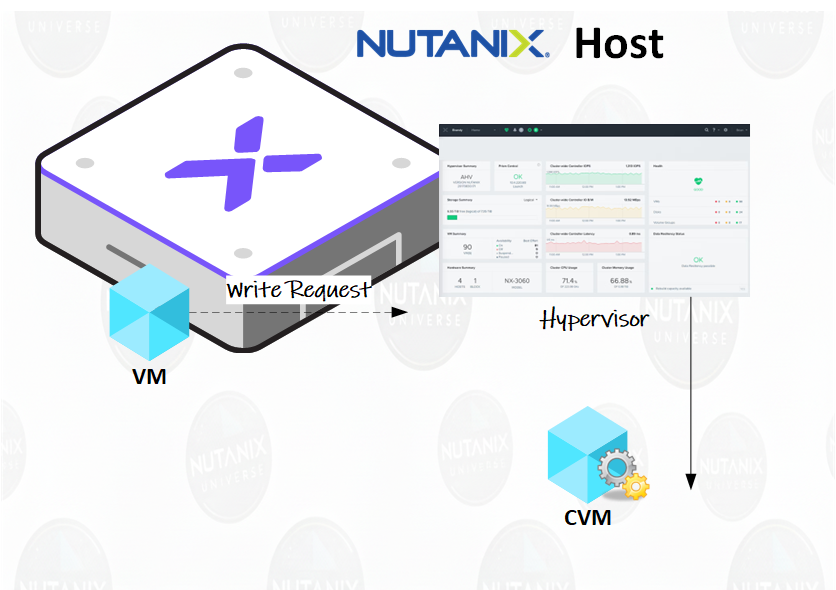
Your VM, through its operating system, sends a request to write a new block of data to its virtual disk (vDisk).
The hypervisor intercepts this request and delivers it to the Controller VM (CVM) running on the same physical node. The communication is local and extremely fast.
Step 2: Stargate and Data/Metadata Creation
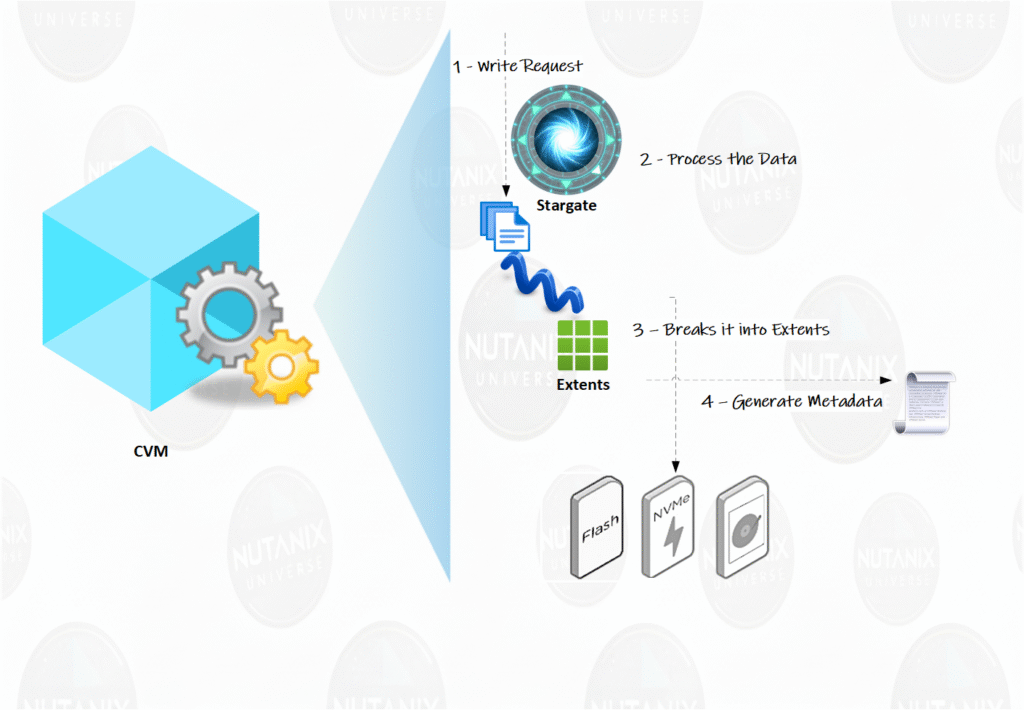
Inside the CVM, the
Stargate service receives this write request. Stargate is responsible for all data I/O management;
Stargate processes the data, breaks it into manageable chunks called “extents,” and writes them to the physical disks (SSD and/or HDD) of that node;
Here the metadata magic begins: For each “extent” that Stargate writes, it generates a vital set of information. Think of it as creating an “address label” for that piece of data;
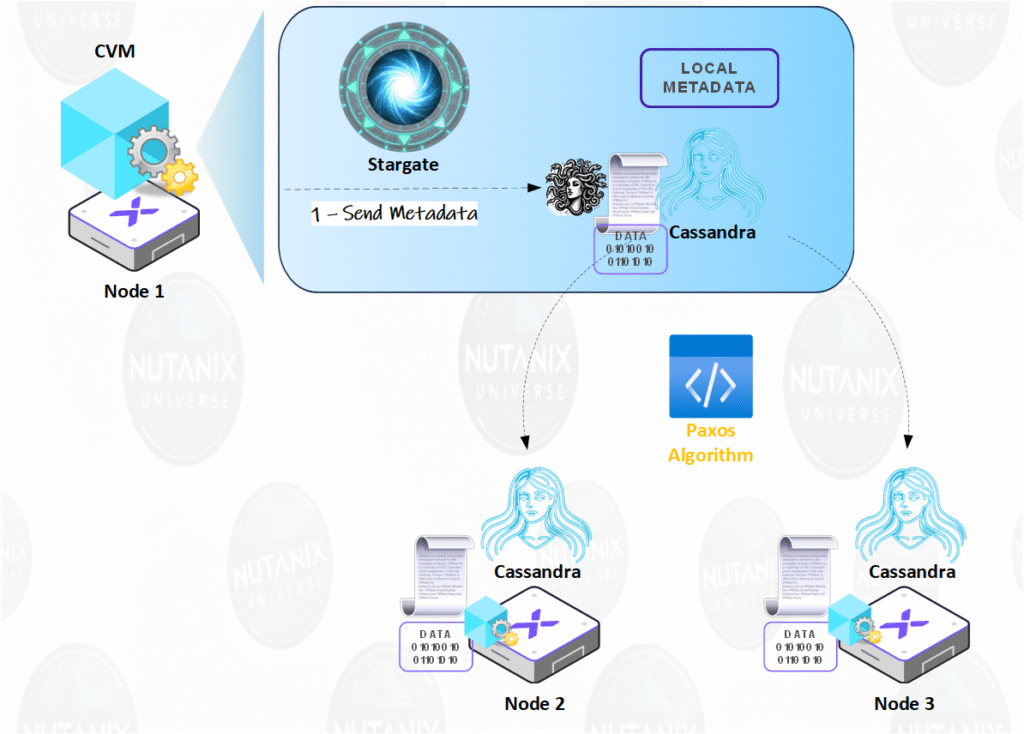
Step 3: Cassandra’s Role (The Cluster’s “Brain”)
Stargate sends this “address label”—the metadata—to Cassandra;
Cassandra, which is a distributed database running on all nodes in the cluster, receives this metadata.
Using the Paxos algorithm, Cassandra ensures this new information is replicated consistently to other nodes in the cluster. This means a majority of nodes must agree on the new information before it is committed, ensuring the metadata is always correct and available, even if a node fails;
What exactly did Cassandra store?
Cassandra did NOT store your actual database record. It stored the “address label,” which contains information such as:
vDisk Information: Which virtual disk this data belongs to.
Logical-to-Physical Mapping: Where, exactly, is this “extent” stored? (e.g., Node 3, SSD 2, Block X). Cassandra stores the mappings of extents to nodes.
Replica Locations: To ensure redundancy (Replication Factor), Stargate also created copies of this data on other nodes. Cassandra knows precisely where every copy is located.
Checksum: A verification code to ensure the data has not been corrupted.
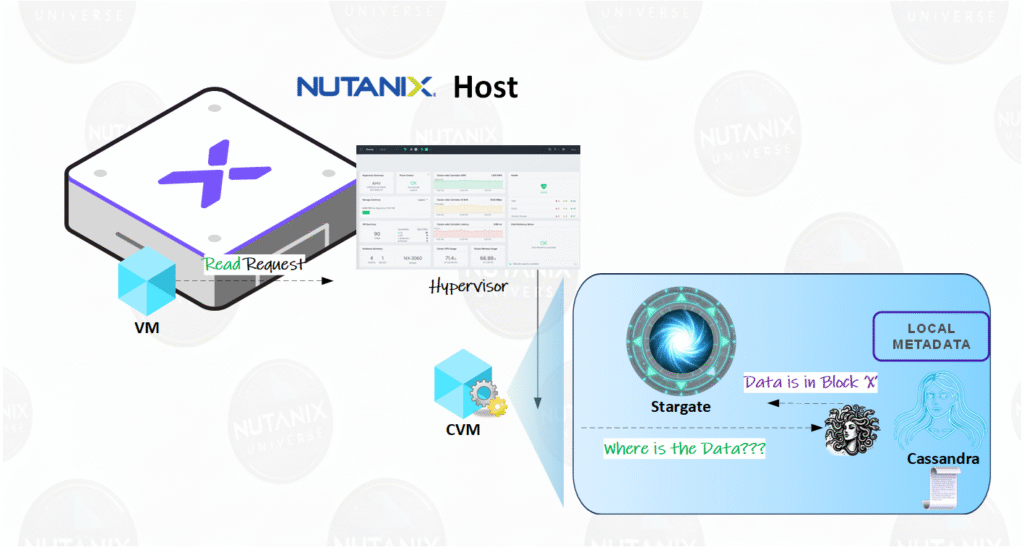
Step 4: Reading the Data (Where Cassandra shines again)
Now, imagine your application needs to read the record it just saved.
The VM requests to read that specific block of data.
The local Stargate receives the request, but it doesn’t know where the data is physically located.
Stargate asks Cassandra: “Where is the data for vDisk Y at logical address Z?”
Cassandra (via the Medusa interface) instantly replies with the exact physical location of the data.
With the “address” in hand, Stargate goes directly to the correct disk, reads the data, and delivers it to the VM.
Conclusion
Cassandra is the distributed brain of the Nutanix architecture, acting as the cluster’s metadata map. Its structure, replicated across all nodes, ensures resiliency against failures and strict consistency via the Paxos algorithm. It allows the Stargate service to locate data instantly, optimizing I/O performance. Essentially, Cassandra provides the intelligence that transforms hardware into a scalable and autonomous platform, making infrastructure invisible.